A tidy Mac menu bar, for free.
Barkeep hides the icons you don't need, groups the ones you do into a single button, and packs CPU, memory and network into one slot. No clutter, no subscription.
Download for macOSWhat it does
Hide the noise
Tuck rarely-used icons behind a chevron. One click brings them back.
Group by name
Fold several apps into one button that opens a labelled dropdown.
One-slot monitor
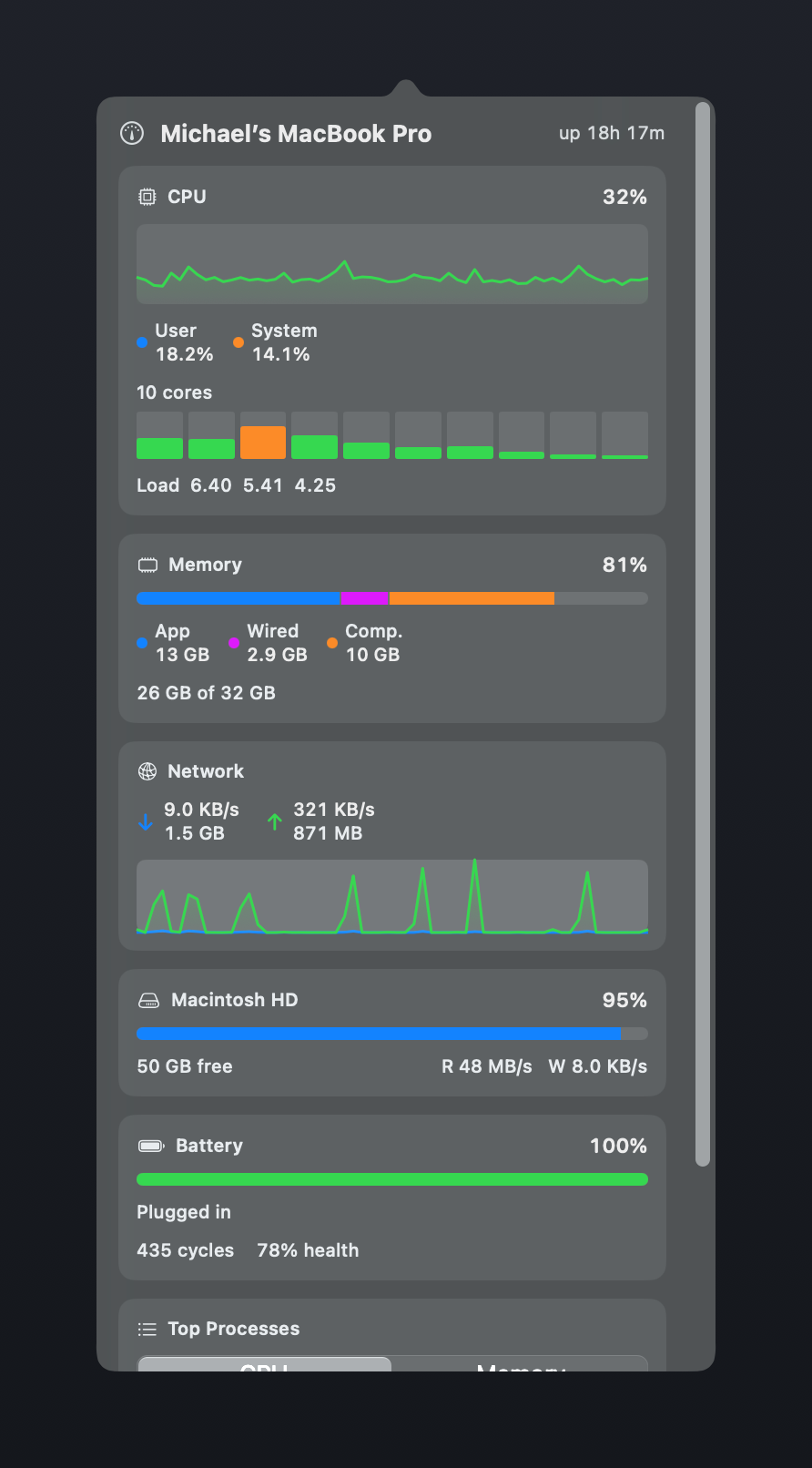
Live CPU, memory and network in a single spot — click for a full dashboard.
Keyboard shortcut
Toggle everything with ⌥⌘B. No mouse required.
No spyware
No accounts, no telemetry. Hiding needs zero permissions.
Actually free
No trial, no upsell. If it helps, tell a friend.
Download
Grab the latest build, drag Barkeep to your Applications folder, and open it.
Because it's an independent app, the first time you open it macOS may ask you to confirm in System Settings → Privacy & Security. See the install guide.
See your whole menu bar at a glance
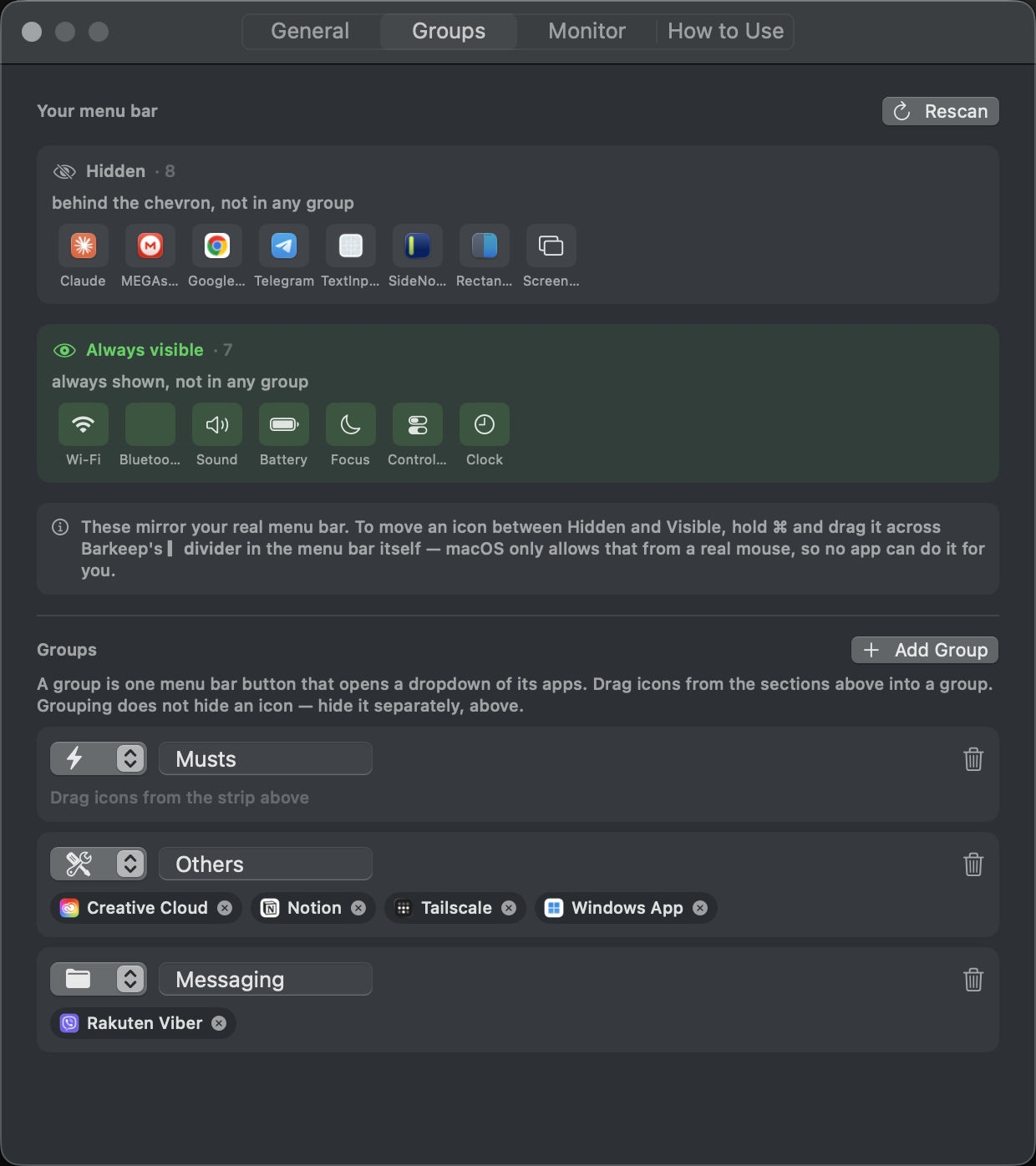
Settings splits your bar into Hidden and Always visible, mirroring the real thing. Drag icons into groups from here.
The dashboard, one click away
The system monitor lives in a single slot. Click it for per-core CPU, memory, network, disk and battery health.
Guides & articles
- How to hide menu bar icons on Mac (free)
- Free Mac menu bar managers, compared (2026)
- Why menu bar icons disappear behind the MacBook notch
- Mac menu bar on multiple monitors: why icons move
- How to rearrange Mac menu bar icons — and why no app can do it for you
- Why menu bar apps ask for Accessibility permission
- Show CPU & memory in your menu bar
- How to declutter your Mac menu bar
For developers: Building a macOS menu bar app in Swift · Why macOS permissions vanish every time you rebuild
Common questions
Is Barkeep really free?
Yes — no trial, no paid tier, no upsell. It's open source under the MIT license, so you can read every line of it on GitHub.
Does it need any permissions?
Hiding icons, the keyboard shortcut and the system monitor need none at all. Only the optional grouping feature asks for Accessibility, and only because macOS reports every menu bar icon as belonging to Control Center — there's no other way to tell which icon is which app. Full explanation here.
Does it collect any data?
No. No accounts, no analytics, no crash reporting, and the app makes no network connections at all. Your settings stay on your Mac.
Why does macOS warn me when I first open it?
Barkeep isn't notarized by Apple yet, so you'll see a one-time "cannot check it for malicious software" prompt. That's the standard message for independent apps, not a virus warning. Open System Settings → Privacy & Security and click Open Anyway. You only do it once.
Can Barkeep reorder my icons for me?
No, and neither can any other app without capturing your screen. macOS only accepts the ⌘-drag reorder gesture from a real mouse. You arrange your bar once by hand; here's what we found when we tested this.
What macOS versions does it support?
macOS 14 (Sonoma) and later, on both Apple Silicon and Intel Macs.
How is it different from the other free options?
Groups and the one-slot system monitor are the main differences — most alternatives do hiding only. We've written an honest comparison of the free menu bar managers, including where Barkeep falls short.
Barkeep is free
No trial, no upsell, no telemetry. If it saved you some clutter, you can buy me a coffee — entirely optional.
☕ Buy me a coffee